What homemade items are in high demand?

Woman selling homemade organic beautycare products in a shop which are in high demand

Now that you know how to make money selling homemade items, deciding the kind of product you are going to specialise in is an important step in making your homemade crafts business successful. There are so many different types of homemade crafts to sell, from  creating beautiful jewellery to personalised pillows. It all depends on your creativity and your skillset; but it’s also important to make sure there is a demand for the product you want to sell. 

A good place to start is to look at best-selling products on websites such as Amazon and Etsy to get a feel for what consumers are looking at when they buy a gift for themselves or someone else. Have a look at the most successful sellers on their websites to see how they market their products and interact with their customers on the platforms. 

The most popular homemade items vary from site to site and depending on the year. But in this blog we will outline some of the most popular homemade crafts to sell online.

Jewellery

If you have the skills and creative passion, jewellery can be a great homemade product to sell. There is the opportunity to create unique pieces which you can sell for a relatively high price. Jewellery also has the bonus that products can be easily personalised, allowing you to increase the price of the product and also give customers interesting gift ideas for birthdays and celebrations. 

There are many different types of jewellery you could create from rings to necklaces, and there is scope to use many different materials to make a product more or less expensive. Jewellery is also easily marketable, with the ability to create galleries of beautiful photographs and to use e-commerce facilities on website builders. The small size of these homemade gifts also means postage and packaging should be relatively low cost. 

Bath Bombs and Soaps 

One of the easiest homemade items to make, bath bombs and soaps can be a great product to sell online. With high demand for bath bombs from companies such as Lush and increasing momentum in the sustainable/plastic-free toiletries movement there has never been a better time to start creating these products. 

Before you start selling, ensure that your homemade soaps are safe to use, that they work effectively and smell amazing. Try to have a range of scents and types of soaps that you sell. Also consider selling items together as a gift set, so that when people go to buy a gift they are directed to your site. 

Planners and Notebooks 

Planners and notebooks are another example of a simple homemade gift to sell which is in high demand currently. If you can create beautiful notebooks and planners there is a high chance of sales and demand for your homemade items. There are many different types of planners and notebooks you could sell, some of the best selling types are:

  • Year diaries – a diary that starts in January and ends in December, usually has a few pages at the start for key contacts, addresses etc.
  • Bullet journal style planners – these are often very minimalistic, but have high quality paper and very aesthetic designs.
  • ‘Prompt’ diaries – these could be anything from a dream journal to a ‘one line a day’ type of journal.

Gift and Subscription Boxes

Gift and subscription boxes are a great homemade gift to sell, they can be so varied and allow you to create personalised boxes or set boxes depending on your customer base. You could market these as gift ideas or as a treat for the customer buying your product. 

Some ideas for gift boxes include:

  • Beauty boxes – this could be anything from drugstore makeup to luxury skincare. 
  • Food boxes – this could be a spice selection, different sauces for fresh produce. 
  • Book boxes – customers send you a book preference and you send them a book every month or a gift box of a few books. 
  • Interest-specific boxes – for example someone may be a fan of gardening or dogs and you send them speciality seeds or sustainable dog toys.

Although we have only listed a small number of ideas in detail there are many other types of handmade crafts you could sell. Here are a few more ideas:

  • Sewing or knitting crafts 
  • Printed t-shirts 
  • Pet products (e.g. toys)
  • Candles
  • Ornaments
  • Artisan sweets and chocolate 
  • Arts and photographs 

If you think you can sell these products but need a great website builder, then look no further than Go Sitebuilder. With built in e-commerce services, our simple website builder design means you can have a professional looking website up and running in minutes. Try our 14-day free trial today!


How can I create a social media marketing strategy?

Black male sat at a desk building a website online with Go Sitebuilder

The way businesses use marketing has changed drastically throughout the years, especially with the invention of social media platforms. The sheer volume of people you can reach through social media means that you must consider creating a social media marketing plan when trying to promote your business. 

A social media marketing plan is a simple plan that a business will use to outline steps to promote their business through social media. Social media plans can be as complicated or simple as you want them to be, but you simply cannot ignore social media in your marketing strategy. If you want to find out how to create a simple but effective social media marketing plan, then read on!

Choose your Platform(s)

One key element of social media marketing is creating a presence across multiple platforms. This means creating a profile or a page on different social media sites. Something to consider when setting up your business on social media is to create a business email, as you will need an email to register with these various platforms.  Below are some of the most commonly used social media platforms and how they might be more beneficial for some businesses than others: 

Facebook: With over 2.5 billion monthly users Facebook is one of the biggest social media sites globally. Facebook is often the first point of call for many social media users as accounts are easy to find and can often be more information heavy than other sites.  

Instagram: Instagram is particularly useful if your business is reliant on visuals, like a photography business or a beauty salon. Instagram allows you to post photographs with captions, but you cannot add multiple links within captions. 

Twitter: Twitter can be a really useful tool to promote your business. Comprised of short “tweets” of 280 characters you can easily share updates on your business and can add photographs or videos should you wish to. Most businesses should have a Twitter account, but for businesses who need to correspond directly with customers (such as event planning) it is an essential tool. 

Linkedin: Linkedin is a networking platform for businesses. Once your profile is created you can make valuable connections with businesses and people that have skills that could complement your business. 

Other Smaller Platforms:

  • Tumblr: an informal blogging platform, good for visually focused related businesses such as art and travel 
  • Flickr: another visual platform, particularly used by photographers 
  • Pinterest: good for creating an aesthetic or developing a brand image

Other factors to consider when choosing which social media platforms to use are:

  • The age of your target market – generally speaking slightly older audiences are found on Facebook and Linkedin, whereas teenagers and Gen Z individuals use sites such as Instagram and TikTok more. 
  • The type of business you are – do you need somewhere that is image-focused or information-focused?
  • Do you have the time to dedicate to multiple platforms? 

Complete Your Profile

The best social media marketing plans have a completed profile to work with. Ensure you fill out every possible section of your social media platform to give visitors the most information possible. Also do not ignore the profile picture, make sure to use something that relates to your business or a logo.

Link to Your Website

Another aspect many social media marketing strategies use is linking your social media to your website. This can be done easily in your profile bio or about section, and can be reiterated in various posts as well. Your web design should also include a social media bar, which many website builders have as a feature, so that readers can easily share your content across various social media platforms. 

Create a Posting Schedule

As mentioned in our blog on how to make your blog stand out,  if you are creating content, posting regularly will give your social media more momentum and give you a larger following. Whether this is once a week or every day, having a posting schedule that you stick to is incredibly important in a social media marketing strategy. If you need more information about when you should be posting, check out this blog on how often to post to each social media platform

Use Promoting Features

Sites such as Facebook and Instagram have features built in to allow you to promote certain posts or images to visitors to their site. You do have to pay for some of these features, but they can be a great way of spreading the word on your business. You can also use features such as hashtags and location to increase the chances of people seeing your posts. 

If you need a great website builder to back up your social media marketing plan, then look no further than Go Sitebuilder. With a wide range features to link to your social media, our simple website builder design means you can have a professional looking website up and running in minutes. Try our 14-day free trial today!

How to make my blog stand out?

Female photographer sat in front of her laptop holding her camera uploading her new photos to her Go Sitebuilder website

In order to create a successful website you need an effective blog. A blog allows you to communicate with browsers to your website in a more informal way. This keeps them updated on any new developments in your business or personal life (depending on the type of website you have.) If you need more information on blogging, check out our post on What is blogging and how can I start my own blog?

With over 77% of internet users regularly reading blogs, updating yours regularly can help significantly boost the number of visitors to your website. Blogging can also be incredibly useful in increasing Search Engine Optimisation; find out more in our blog on the benefits of creating a blog for SEO purposes. 

To engage the most visitors on your website there are critical success factors to creating a unique, popular blog. Read on to discover how to make your blog stand out from the crowd! 

Professional Web Design

No blog will be successful if the website is poorly designed. Think about key aspects such as layout, colours, fonts and images to create a professional website that reflects your business. 

Ensure that your blog is easy to find on your website, with links to recent blog posts and a clear blog heading in your menu. Adding a search bar is a great way to make it easy for visitors to find blogs that align with their area of interest. 

Effective Titles

For your blog posts to have the most views, effective titles will go a long way. Ensure you keep your titles short and to the point and that they relate to your blog post. 

The content of your blog posts can be as varied as you like. However, if your website focuses on a specific topic or is for a business you should ensure that your blog posts link directly to it. Some examples are: 

Beauty Salon Blog: 

  • “Tips for creating the perfect manicure”
  • “Hairstyle trends you need for 2020”
  • “The skincare trick everyone is raving about”

Lifestyle Blog:

  • “How to interior design like a pro”
  • “My favourite fashion trends this year”
  • “How to organise your busy schedule”

Travel Blog:

  • “Countries to visit this month”
  • “The best ice cream I’ve ever tried: Rome’s food scene”
  • “Top tips for backpacking”

These are only a few titles for different types of blogs, but they all have one thing in common. They directly target an audience and tell you exactly what the blog post is going to be about. Using titles which will directly relate to and impact the reader is sure to gain you more views on your blog. 

Use Different types of Media

By using a variety of media you are more likely to engage a wider range of browsers to your website. Large portions of text can also put visitors off, so adding subtitles or different media like images and infographics can keep visitors on your blog and reduce your bounce rate.  Images are also a way to help engage your visitors with your content by illustrating the ideas and concepts in the blog.

You can include media such as:

  • Photographs 
  • Infographics 
  • Illustrations/paintings 
  • Longer produced videos 
  • Shorter informal videos 

If you need more reasons to include media in your blog posts, check out this blog on 8 data driven reasons why media is important to blogging success.

Create Unique Content

With so many different blog posts online, creating unique relatable content is paramount in making your blog stand out. Do some research on what competitors or similar blogs are posting about and think about how you can improve on this or offer a different perspective. Is there a topic that you are particularly knowledgeable or passionate about? If so focus on that for a number of blog posts to show your understanding of it. 

Another key aspect is to ensure that you are posting regularly to your blog. This is one of the critical success factors of your blog’s popularity. Without a regular schedule you will lose following and regular engagement with your blog by visitors to your website. Each time you post a blog, search engines will re-index your site and hopefully boost your page up the search rankings.

Some people will write a chunk of blogs at once (for example 10 blog posts on the same topic) and then make a schedule for posting them. Whereas, others may post on a schedule and write as they post. Whichever option works best for you, ensure you stick to it to get the best results. 

If you need a great website builder, then look no further than Go Sitebuilder. With a wide range of blog friendly features, our simple website builder design means you can have a professional looking website up and running in minutes. Try our 14-day free trial today!

What is an ecommerce website?

Online seller owner take a photo of product for upload to website online shop. Online Shop, Online Selling , Online Shopping and e-Commerce concept.

Back in 1979, British inventor and entrepreneur created an online payment processing system, and the ecommerce business has been growing ever since. Buying and selling online is called ecommerce, and as internet reach grows worldwide, so do ecommerce sales; they are expected to reach 17.5% of all retail sales worldwide, up from just 7.4% in 2015. 

An ecommerce website is an online platform that allows a user to browse different products and buy them, but this could apply to multiple industries and multiple product types.

What are the different types of ecommerce?

Ecommerce can take many forms. Well-known companies like TopShop or Mountain Warehouse have B2C (Business to consumer) websites, which means the company sells their product directly to the buyer who will then use it themselves, but there are other ecommerce models.

B2B ecommerce sites are where businesses sell to other businesses, like Polygon, which sells video conferencing and content sharing solutions to other companies. Ebay is an example of C2C ecommerce, where an individual sells something to another individual. C2B is rising in popularity with the growth of freelancing and the digital nomad lifestyle, where an individual supplies products or services (like blog writing or stock photography) to a business for them to use. 

There are also different ways to carry out your ecommerce business. Do you sell physical products, like books, or digital products, like music, video or graphic design? This will impact whether you have to deal with postage and packaging and possible returns. You will also have to decide whether to sell B2C retail (individual items) or B2B wholesale, where items can only be purchased in large quantities, as this will affect your pricing and marketing strategy. 

How to build an ecommerce website

When designing your ecommerce website, or using a website builder to design it, there are some elements you want to make sure you include. The first is to choose a layout that represents your brand and the product or services you are trying to sell. When in doubt, remember to err on the side of simplicity; we know from experience that customising each level of your website can be time consuming and frustrating, so it’s a good idea to find a website builder that offers ecommerce templates. Then you can just drag and drop the information you need into the website without wasting unnecessary time. 

Before choosing a website builder, be aware that many providers have a base price for a website, but then charge extra if you want to use their ecommerce platform or if you want to sell over a certain number of products. At Go Sitebuilder, our monthly fee includes all our services, including an unlimited ecommerce platform, voucher and discount codes and automated warnings when you start running out of stock; and it’s so simple you can upload a product in a matter of moments!

What features should my ecommerce website have for shopping?

Let’s start with the basics: You need to get paid! Choose a payment gateway, like PayPal or Stripe that will allow your customers to easily purchase your products through your website; check out our blog on payment gateways for more information. 

The problem with ecommerce is that your potential customers can’t hold your product in their hands before they buy it. This is why high-quality product photos are so important; make sure you have more than one for each product and that the images are well-lit and show off all the product features. Detailed product descriptions also allow your potential customers to decide if your product has everything they need; aim for 150-250 words per product. 

Transparency is essential for an ecommerce website, so make sure your postage and packaging and returns policy are easily accessible. If a visitor arrives on your site and can easily find all the information they need without having to search for it, they are much more likely to order a product from your website rather than somebody else’s.

What features should my ecommerce website have to improve user experience?

Think about arriving at your site from a visitor’s perspective. If they know exactly what they want to buy, then having a product search bar will allow them to find it quickly and easily. If they’re just browsing, though, why not have your most popular products on the first page to give them an idea of what you sell, and persuade them to buy something. 

Most importantly, you need to make sure your ecommerce website is responsive – meaning it works equally well on desktop, tablet and mobile devices. According to Statista, in the US nearly 50% of ecommerce sales took place on a mobile in 2019 and you don’t want to miss out on this market. 

If you’re still looking for a website builder for an ecommerce business, then Go Sitebuilder is a great choice! We offer unlimited products, an integrated super-simple ecommerce platform, full responsive design and more! Try our 14-day free trial today to see what we can offer you and your ecommerce business.

How to manage images on your website

Handsome man working remotely researching how to manage images on your website from the coffeehouse on Go sitebuilder

Images are an important part of any website. In fact, websites with images get 94% more views than those without, so if you want to entice potential customers to your site, you can’t ignore them. However, you can’t just upload lots of randomly generated images and hope that it will increase traffic. Check out our blog post on how images enhance a website to see how you can make your images work for you.

Having an image-heavy site could mean that your website homepage becomes slow to load, or could confuse users if the photos aren’t related to your product. We’ve compiled a handy guide to help you manage images so that your visitors will have a great user experience, regardless of how many photos you choose. 

How do I make images load faster on my website?

Google web research says that the best loading time for your website is under three seconds. It’s crucial to make sure that your website loads in this time, as if it takes longer, even between 3-5 seconds, there is a 90% bounce rate. Their research also found that 79% of online shoppers that have trouble with website performance – like slow loading speed – say that they won’t return to that site again. 

Use a loading speed analyser like GTmetrix to see how long your site takes to load – if it’s longer than 3 seconds then read on to find out what you can do!

Image file size

Most often, when you find a picture that you think is perfect for your website, you don’t think about whether it is the right size, and you upload it straight away. It’s good to start with a high-quality image, whether that is your own photo, one from a free stock image website like Pixabay, Pexels and Unsplash, or Go Sitebuilder’s ready-to-use stock image directory. However, to streamline your site you might need to make the images smaller so they don’t take up so much space. 

Resolution

The resolution of your image refers to the quality of the image and is measured in dots per inch (DPI). The more dots per inch, the better quality your image will be. This is very important when processing images for print, but most computer monitors display a maximum of 72DPI. That means that any image with a higher resolution than 72DPI is overkill; your visitors won’t notice the difference and your image will be taking up unnecessary space. 

To see the resolution of an image on Windows, right click on your image file name and select Properties → Details. Click on the image tab within the window, and you’ll see the DPI labelled horizontal resolution and vertical resolution. On a Mac, open the image in preview and select Tools → Adjust Size and you’ll find the option under resolution. You can use Photoshop or Gimp Image editing software to change the resolution, or an online converter like convert.town.

Reduce file size even more

Reducing the resolution will also reduce the file size, but to make the file size even smaller, it’s a good idea to put the 72DPI image through an online compressor like Compressor, Tiny PNG or Optimizilla. This drastically reduces your file size but with an almost indiscernible difference in image quality. Don’t believe us? Have a look at the difference:

300DPI image from Pixabay
Reduced to 72DPI
Compressed 72DPI image

Choose the right file type

Most images in websites are found in three file types: PNG, JPG (or JPEG) and GIF. You shouldn’t be uploading any other image files to your website, so if you have a file type you’ve never seen before, open it and click File → Save as and change the file type, or click File → Export as + JPG/PNG/GIF. But which file type should you use for which image?

  • Use JPG for photos and photorealistic images
  • Use PNG for computer generated images and graphics where transparency is required
  • Use GIF for small animations

Top tip – if you’re taking a screenshot it will likely save as PNG. If you’re going to upload it to your website, make sure you export it as a JPG first. Adhering to these simple file type rules will make your images work better for you. 

Optimise your file names and alt-tags

This might be boring, but it’s very important! To help with SEO, you want Google’s crawl bots to look at your site and check that it is all relevant to your topic, and these crawl bots can’t “see” images in the same way we can. So, when it comes across a file name called DSC43953, it is not going to know whether it is related to your business or not. You don’t need to put in a long description, but if you sell bespoke ceramics and your image is called “white-glazed-pot” then search engines will understand what it is. 

The same goes for alt-tags. You should be able to alter these within your website builder, and you want to describe it as if to a friend who is wearing a blindfold, using as few words as possible. Avoid using small words like “a” and “the” as you don’t need them. “White pot on table” is fine. Ideally you want to use your keywords for both file names, but don’t shove it in there if it doesn’t make sense to. 

So, now you know how to manage your images to have a fast-running website, you’re ready to make your own! Try Go Sitebuilder for a super simple website builder that gives you ready made templates to personalise, so you can have a beautiful website up and running in minutes! We offer a 14-day free trial so you can see for yourself – happy building!

How do images enhance a website?

Beautiful girl working from her home researching how do images enhance a website

Imagine a website without images. You can vary the text size and font as much as you want but it’s still not going to be pretty. These days, images are the simplest way to make your website look more visually appealing, but the right images can actually have a significant impact on how users interact with your website. We’re going to look at the different ways images can enhance your website, so you can choose the best photos for your company.

Images look good

Ok, so it’s not just about looking good, but that is an important part of using images. 

The last thing you want from your website is a homepage that is covered in text; users are likely to be overwhelmed and will click off immediately. Instead, try and use a high-quality image that reflects your brand with a call to action in large font; Do you want the visitor to buy your product, download a resource, or contact you?

First impressions are everything; 75% of people base their opinion of a website’s credibility on the web design, so you want to make sure yours stands out. 

Good images increase traffic

If you use high quality, beautiful images on your website, this actually has a significant impact on the likelihood that visitors will turn into customers. Photography provider Pic-Up reported that websites without images got 94% fewer views than those with them, and the more views you get on your site, the more chances you have that they will convert. 

Human beings are very visual creatures and we are drawn to images, which is why we use them so much on websites. It also has marketing results:

  • Increased user engagement. This means users spend more time on the site, making it more likely that they will contact you or purchase your product or service. 
  • Decreased bounce rate. This means that you will move higher up search engine rankings, bringing you more traffic. More traffic means more customers!
  • Well chosen images create a link between the customer and your company. This makes them more likely to convert because they feel a connection with your business.

Images make your brand memorable

To make your brand – and website – memorable, you need to decide on a style that best represents your brand and what your company stands for. Create a collection of quality images that have similar qualities, for example a particular colour theme or lighting style, and use these images across your website, on your office walls, in your brochures and on online directories. This will bring a sense of continuity, consolidate your brand image and make your products and services more memorable. 

You might only have stock images at your disposal, which is fine – Go Sitebuilder has a huge directory of stock images – but try and choose pictures that have qualities or characteristics that connect them – low-light photos, for example, or a minimalist style that makes the most of white space. Research has shown that we remember 80% of what we see, but 20% of what we read, so make sure you don’t get lazy with images!

Product photography drives sales

Never underestimate the power of product photography. First and foremost, having product photos that accurately capture your product aids clarity for your customers. Many online returns are due to the fact that the product looked different online to the item they received, so good product photos result in fewer returns, meaning less time and money wasted. 

Good product photos are also a way to hook in those viewing your site on a mobile device. People on their phones are less likely to have the time or the inclination to read a lengthy product description, so they are going to choose the product image that captures their eye. 

Good photos could make or break a sale. Think about how you shop; if there are two similar products at a comparable price, you’re going to choose either the one with the better picture, or the one that has more photos. A better picture makes you look more professional, and more pictures represents your product better, making you a more trustworthy company to shop from. 

Optimised images are better for SEO

If you optimise your images for SEO then you are more likely to rank higher in search engine results, giving you more traffic. To do this, choose relevant, high quality images and customise the file name. Google’s crawl bots can’t “see” images, so DSC16632 means nothing to them. Change it to something relevant and ideally including a keyword for your business; if you sell jewellery, for example, naming the file “green-necklace” is much more useful. 

This is the same for alt-tags on your images, which are also used by search engines to understand what an image is. You should be able to alter these in your website builder. Top tips: describe the image in a few words as if you were talking to a friend with their back to the screen, don’t include those small words like “on”, “a”, or “the” and don’t start with “image of…” as it’s not necessary. “Woman wearing green necklace” is ideal.

If you’re worried about an image-heavy website slowing down your website speed and making your site laggy, then check out our blog on how to manage images on your website. If you’re ready to create a new site with beautiful images, then try Go Sitebuilder! We have ready to go templates for you to upload your own photos, or you’ll have access to our extensive stock images section. Try our 14 day free trial today!

How can I grow my accounting firm?

Black manager holding pen make notes on textbook using pc to brainstorm how he can grow his accounting firm

If you own an accounting firm and want to boost your growth then the internet can be your virtual gold mine. The rise of technology has enabled large and small businesses alike to expand their clientele online, resulting in a larger customer base – and increased revenue. As an accountant, the internet offers endless opportunities for you to grow your accounting firm – you just need to know where to start. 

Of course, if you’re planning on expanding your online presence, you’ll need a website to advertise your accounting firm. Unless you’re a coding expert, using a website builder is the quickest and easiest way to build your own site. This enables you to concentrate all your energy in working to ensure your accounting firm is a success!

Have a strong website design 

When building your site for your accounting firm, thoroughly considering what you want your website design to look like should be an important part of your strategy. According to a study conducted by Adobe, two-thirds of site users would rather read something beautifully designed, as opposed to something plain. 

Consider your target audience: as an accountancy firm, you won’t be expected to have a website design filled with colour and animation. However, a professional web design doesn’t have to look boring: select a sleek colour theme with a contemporary edge to create an eye-catching design that makes visitors to your site want to explore everything you have to offer. 

When building your site, you must make sure that you have a responsive website – this means it must be accessible from any device, without losing the aesthetic of your website design. Look for a website builder that allows site users to view your site from mobile, tablet or desktop: Go Sitebuilder includes this as part of our package, so that you can make edits and update your site anywhere, at any time. 

Concentrate on your marketing strategy 

Gone are the days when spending thousands of pounds on billboards or TV adverts was the only way to successfully advertise your business. Social media is an invaluable marketing tool, as it lets you get creative, adding a personal touch to your accounting firm. According to AccountingToday, what distinguishes high-growth accounting firms from low-growth firms is that they spend nearly 42% more on digital marketing.

Working on improving your social media platform and SEO strategy is a great way to increase visibility and drive traffic to your website. Social media also helps keep existing customers engaged with your services – considering that 25% to 40% of new business generated by the top accounting firms comes from cross-selling to existing clients, you shouldn’t ignore the clients you’ve already gained. 

Encouraging site users to follow your social media accounts or sign up to your emailing list acts as a reminder of just how your accountancy firm can help them, and also helps to build more of a relationship between company and client. When building your website, make sure you add in links to your social media sites on your main pages to ensure your accounts are easy to find and follow. 

Offer free high value content

According to the 2019 Marketing Budget Benchmark Study, the highest-growing accountancy firms spend 6 times more on educational services – such as webinars or blogs – than lower-performing firms and, as a result, grew 10 times faster. By offering free content for your clients or potential clients, you’re showing them that you care about providing them with a premium service and that, as a financial adviser, you have all the necessary knowledge in the accountancy sector.

When selecting a website builder, make sure their blogging platform is simple and easy to use – not only do blogs allow you to share helpful bits of knowledge which site users can share, but they’re also a vital part of a strong SEO strategy. 

Google likes high value content, which is why writing blogs which answer commonly asked questions and include popular keywords can dramatically improve your ranking on Google’s search engine page results. If Google trawls your accountancy firm website and sees your content is of high quality, you’re more likely to rank highly, drawing in more traffic to your site. 

To fully concentrate your efforts into growing your accounting firm, you’ll need a website builder which offers ready to go website designs and easy-to-use software. Go Sitebuilder includes everything you could need to build your own high quality website with a professional finish at an incredibly affordable price. Our 14-day free trial means you can start growing your accounting firm today, without any restrictions!

Why do you need a responsive website?

Portrait of handsome young man using his mobile phone in the kitchen choosing his responsive website design with Go Sitebuilder

A responsive website design is a must-have when building your own website. Essentially, a responsive website adapts to the size of any screen that it is being viewed on – this is different to a mobile-friendly site, which is a separate, simpler version of your site designed solely for mobiles, which might have glitches and is difficult to navigate when viewed on high resolution devices. 

Nowadays, it is hard to deny that the internet is reshaping the way we typically buy goods: in 2013 internet sales of non-food products in the UK grew by 19.2% compared to the previous year. With 7 out of 10 people in the UK now owning a smartphone, it is hard to deny that there is a strong link between ecommerce shopping and mobile phones. If your website isn’t responsive, and therefore has to have two different versions of one website for different devices, you could harm your business’ growth. If you’re still not convinced, read on to discover just how a responsive website can boost your website’s chances of success. 

Reduce your costs 

Starting up an ecommerce business online can incur many hidden costs, slowly pushing up the expenditure for your website. To build your own website from scratch without a website builder means you’re already spending a lot of time and money on necessary features such as your website design and site coding. If your website is responsive then you only need one version of your page, but if it isn’t then you’ll need another version, with a different URL, so that it can be viewed on a different device. 

With a responsive website, you can cut down the costs of running your website, as you won’t be paying for two versions of the site. It also halves the time you spend doing maintenance on your site, meaning you can concentrate your time more efficiently in other ways to grow your business. 

Increased conversation rates 

As an unresponsive website usually distorts the way your website appears on mobile devices or tablets, that affects multiple aspects of your website design, such as your layout or your font sizes. Imagine you’ve spent hours perfecting your site design, only for it to lose all aesthetic when it’s not viewed on a desktop. 

Understandably, a website that isn’t easy to navigate is going to put off potential customers, damaging your ecommerce site or tarnishing your reputation. As 67% of mobile users are more likely to buy from a website with a responsive web design, you need to build a website which doesn’t exclude a large chunk of your target market. 

Having a responsive website also markets your image as a professional: with only one URL, users who share your content on their social media only have one link that they can share. With two URLs, a site user might share your link on their desktop, which is then seen and clicked on by another person who is viewing your website from a mobile device. As the link won’t respond well to their mobile device your website will seem clunky and poorly designed, prompting them to lose interest in your business before they’ve even properly explored it. With one URL, you can avoid this issue completely – your site will be ready to view on any device. 

Improve your SEO ranking 

Boosting your SEO ranking can boost your business’ success dramatically: considering that Google recommends a responsive website pattern, it’s best to follow its guidelines to make sure you rank as highly as possible on search engine results pages. Having a responsive website isn’t just good for SEO because Google likes it – there is actually a method behind it. By using a single URL structure, you’re giving Google’s spiders less work, as they don’t have to crawl and index both versions of your site, and then decide which version to show on its search engine results. 

Building a website with a responsive site design also improves your SEO ranking as it means site users are more likely to stay on your website for longer. Having a low bounce rate tells Google that your site is valuable and should therefore be listed higher on its search engine results, whereas a site with a high click-off rate suggests to Google that your website is of poor content, and should therefore be lower on its index. 

If you want to build a website, but don’t have the time to spend hours coding, or the money to hire a professional website designer, Go Sitebuilder offers ready to go site designs at an incredibly affordable price. One of the best things about our site? It delivers responsive websites so site users can access from any device, and you can even update or make changes to your site anywhere you want. Our website builder provides a professional finish, without the premium prices – to find out for yourself, start our free 14-day trial to discover all the benefits we offer, and more!

What are website templates?

Portrait of nice lovely attractive cheerful cheery positive couple choosing their website design on Go Sitebuilder

When using a website builder to design your website, the first step will often be to pick out a website template. A recent study showed that 88% of browsers will not return to a website if they experience a single poor user experience. Therefore, having a great website design is incredibly important, and website templates are the start for this. 

Website templates provide a structure and web design to your website. They often come with a pre-assigned layout for menus and navigation, but can also be easily changed if you want to personalise them. 

Often the design of your website template will impact the theme of your website and how visitors interact and view your website. Depending on which website builder you use there will be different website templates and designs, often grouped by type of website. 

How to choose a template

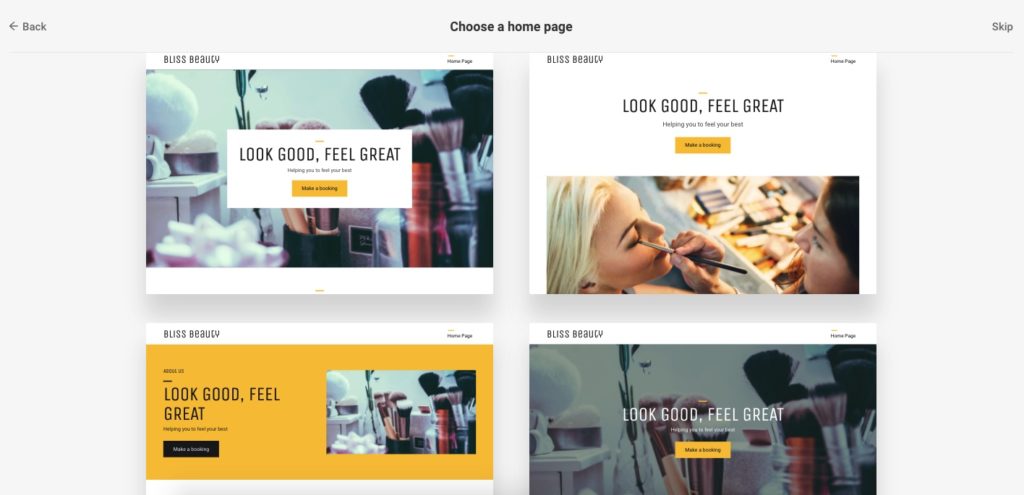
Often when you sign up to a website builder you are given a range of templates to choose from to build your website on. Each template will have slightly different designs and (potentially different) features, therefore choosing the right one for your website can be difficult. Look through a few designs in detail before choosing one to use for your website. With Go Sitebuilder, we help you choose a perfect template for you by showing you preferred templates according to your industry. For example, this is the selection  you’d see if you were trying to build a website for a beauty salon:

The Importance of Choosing the Right Template for you

Given the wide range of website templates on the various different website builders, choosing the right one to suit your business or blog is very important. Your website theme will be impacted by which template you choose. Therefore, the web design and navigation aspects of your website will also be affected depending on which template you choose and how you personalise it. 

When picking your website template consider the following questions:

Does the design link to my brand image? 

Does the design immediately tell your customers the type of business you are? If you are running a travel blog your design will be very different to that of an accounting firm. 

Do I need to pay for this website template? 

Website builders often have a range of templates, some of which are free website templates and some which have a fee attached to them.

Does it have the features I need?

For example, a photography business will need to be able to show a gallery, whereas a business which uses online sales will need an e-commerce website template. 

Does the website builder allow me to modify the template?

There is no point choosing a website template if you are not able to change aspects of the website to incorporate your information and style. 

Different features of website templates to look out for

When choosing your website template there are a number of different features you may want to look out for. Some of these features will depend on the type of website you are building, whereas others are good to have no matter what website you are designing.

Some of the most common features to look out for are:

E-commerce website templates: these are useful for business selling products online. Features to look out for on e-commerce website templates are:

  • The ability to take payment
  • How products are shown on your website 
  • Ability to show discounts of offers on your products 
  • Delivery options 
  • Ability to group products into categories, thus making the user experience easier to find the products they are looking for 
  • Order status – the ability to keep your customers updated on the status of their purchase 

Image galleries: particularly important for photography businesses or travel businesses. Look for different layout options and the ability to add more information about each photograph.

Image editor: useful for quickly editing your images as you upload them

A blog feature: the ability to create informal content will increase interaction between visitors and your business. Look for features such as the ability to categorise your blog posts and an unlimited number of blogs.

Contact forms: this allows customers to contact you easily from the website, allowing you to respond and foster a customer relationship easily.  

Responsive design: the ability to view and edit your website for mobile phones or tablets. This is especially important as many people will be viewing your website on a mobile device 

Social Media Integration: this could include the ability to link certain blog posts to Instagram posts or simple links to social media profiles in the header of your website.   

If you need a great website builder, then look no further than Go Sitebuilder. With a wide range of website templates, our simple website builder design means you can have a professional looking website up and running in minutes. Try our 14-day free trial today!

Do I need a privacy policy statement on my website?

Three businesswomen looking at laptop and smiling as they have confirmed the privacy policy statement on website

If you’re building a site which requires people to give you their personal details, it is now required by law for you to provide a privacy policy statement. This is especially important if you’ve built a website with an ecommerce platform, as you are handling sensitive payment information and people need to be reassured that their details won’t be misused by your site. 

However, even if your website doesn’t take payments over the internet, but still requires people to give you their phone number, email address, home address etc then you still must include a privacy policy statement.

This is covered in EU law under the General Data Protection Regulation (GDPR), as well as a UK Act of Parliament: the Data Protection Act 2018 (DPA). A privacy policy statement isn’t just to look professional: the penalties for breaching someone’s privacy rights can be up to 4% of your global revenue, or €20 million – whichever is the highest. Don’t worry if you’re worried you might write an incorrect privacy policy statement: we’ve broken down how to tackle it, so you can build your own website stress-free!

What is a privacy policy statement?

A privacy policy statement is a written statement that details how your company uses and manages a customer’s details. It is necessary if you’re collecting personal information from your site visitors, and it needs to be clearly visible on your site, as well as on a mobile app if you have one. 

Covered under both EU and UK law, a privacy policy statement is legally binding: you must tell your site visitor what kind of information you’ll be gathering from them, what you’ll do with these details, and how you’ll keep them safe. Not only does the law state that you must display this notice, but you also must not breach any of its regulations. This ensures the privacy of your site users is protected, and you can’t use their personal information for other purposes without their consent.

Why do you need a privacy policy statement?

Whilst you need to include a privacy policy statement when building your site as you are legally bound to do so, it also is important from a marketing perspective. If you have an ecommerce platform, then people are not going to want to give you their personal details without being reassured that they are completely protected. 

If you have an online store, then people aren’t going to put in their credit card details if they think there’s any risk of you stealing this information, meaning you’re less likely to sell products online. 

Personal information doesn’t just mean card details: it can include even seemingly trivial details, such as an email address. Without a privacy policy statement, a site user may be unsatisfied that their email address will be properly protected, thus deterring them from giving you this information. This means you can’t add them to your mailing list, barring you from sending them emails about the latest deals and updates to your website. 

How to structure it 

Don’t worry – you don’t have to trawl through the GDPR and the DPA to try to work out how exactly to structure your privacy policy statement. There are plenty of free resources to use online which can help you: SEQ Legal has an easy-to-follow template that you can download for guidance, or for official guidance, the EU template can also be downloaded for free. Of course, you’ll have to edit some of the details so that it’s relevant to your business, but it is a handy guide to refer to if you’re not sure where to start. 

If you need a breakdown of the language used, then the EU has produced a guideline to the wording. If you want to read the legislation to see the exact wording in the legislation, then read Articles 12, 13 and 14 of the GDPR. 

According to the GDPR, a privacy notice must be:

  • Written in concise, legible language 
  • Written in clear and unambiguous language, with special care taken if the site is directed to a child
  • Provided for free

When building your site, you’ll want a website builder that is easy to use, but still delivers stunning website designs for a professional result. Go Sitebuilder includes an ecommerce platform within our bundle, making us one of the cheapest website builders with this feature in the UK. Don’t let creating a privacy policy statement deter you from building your dream website; once you’ve downloaded one of the free web design templates, Go Sitebuilder makes everything all the more simple – try it today, with our free 14-day trial!